
One payment. Six months. No surprises.
EnCiro has three plans: Free, Learn, and Pro. No monthly subscriptions. No auto-renewals. No "cancel before day 7 or we charge you" tricks. You pay once, you get 3 months of access. That's it.
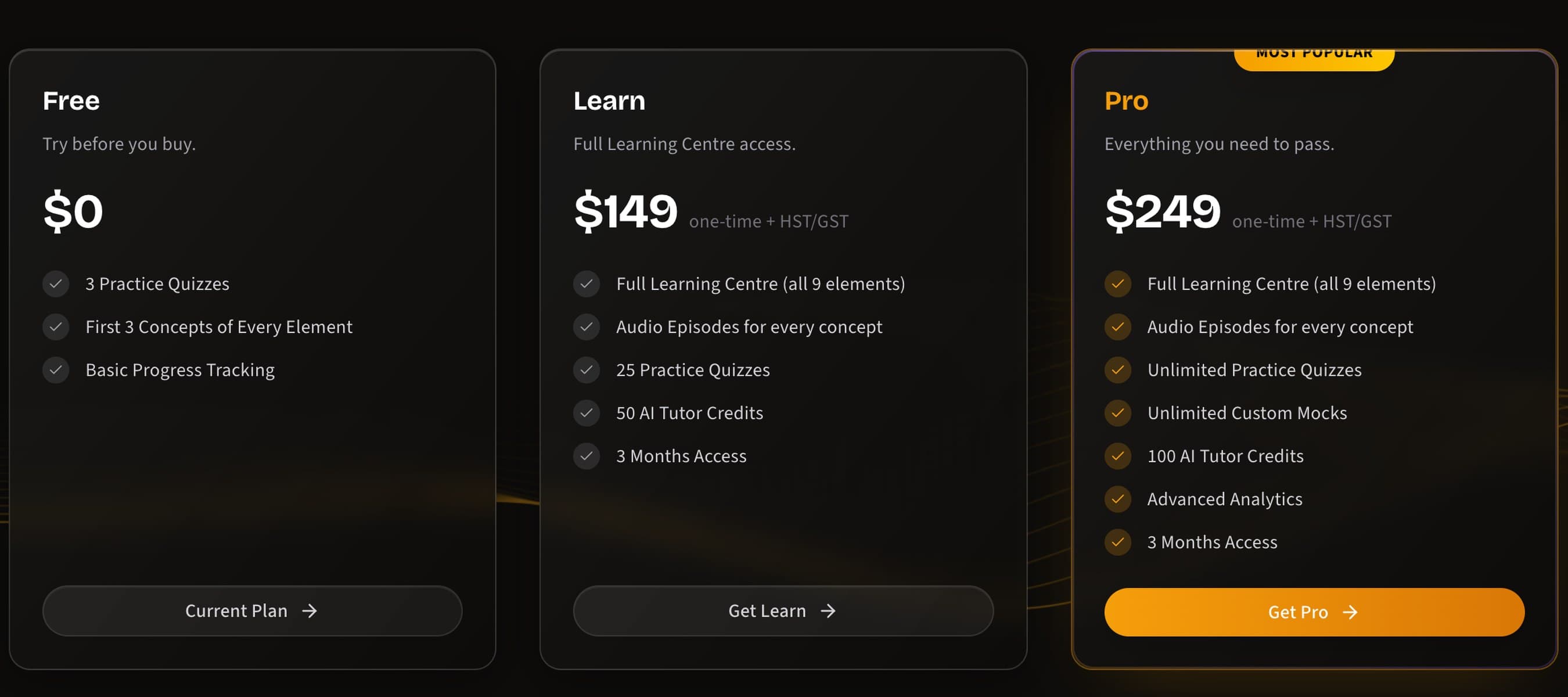
What each plan includes
| Feature | Free | Learn ($149) | Pro ($249) |
|---|---|---|---|
| Practice quizzes | 3 quizzes | 25 quizzes | Unlimited |
| Learning Centre | 5 concepts | Full access (all 9 elements) | Full access (all 9 elements) |
| Custom mock exams | — | — | Unlimited |
| AI Tutor credits | — | 50 credits | 100 credits |
| Analytics | Basic progress tracking | Full analytics | Advanced analytics |
| Daily challenges | Yes | Yes | Yes |
| Access period | Never expires | 3 months | 3 months |
Free — the test drive
No credit card. No "free trial that charges you on day 8." You get 3 practice quizzes, 5 Learning Centre concepts, and basic progress tracking. Enough to see if the platform clicks with how you study.
It never expires. Use it for as long as you want. When you're ready for the full experience, upgrade.
Learn ($149) — for steady preparation
One payment, 3 months of full access to the Learning Centre and 25 practice quizzes across all 9 CIRE elements. You also get 50 AI Tutor credits — enough for targeted help on the concepts that genuinely confuse you.
This is where most candidates start when they commit to serious study. At $149, it's a fraction of what a prep course costs — and unlike a course, you study at your own pace.
Pro ($249) — everything you need to pass
Everything in Learn, plus:
- Unlimited practice quizzes — no cap on how many you can take
- Unlimited custom mocks — build exactly the exam you need (here's how)
- 100 AI Tutor credits — double the Learn allocation, enough for deep-dive conversations on every element
- Advanced analytics — the full suite of element mastery, difficulty breakdown, time analysis, and scatter quadrants
Pro is the plan for candidates in their final stretch. If your exam is 4-8 weeks away and you want every tool available, this is it.
Which one should you pick?
Start with Free. If you like the platform, Learn gives you the content and credits most candidates need. Go Pro if you want unlimited quizzes, custom mocks, and the full analytics suite — or if your exam date is looming and you don't want to hit a quiz limit mid-prep.
Already on Learn? You can upgrade.
If you started with Learn and want to unlock Pro features, you can upgrade for $100 — the difference between the two plans. No double-charging. Your existing progress, analytics, and AI Tutor conversation history carry over seamlessly.
How to purchase
Go to the pricing page
Click Pricing in the top navigation bar, or scroll down on the home page. All three plans are shown side by side.
Pick your plan
Click Get Learn or Get Pro. You'll be taken to a secure Stripe checkout page.
Pay once
Any major credit or debit card works. One charge. No recurring billing. No stored card surprises.
Access unlocks immediately
Your upgraded features are live the moment payment processes. No waiting period, no activation emails. Just go.
The fine print (it's actually fine)
- One-time payment — not a subscription. You pay once, you get 3 months.
- No auto-renewal — when your 3 months are up, you choose whether to purchase again. We don't silently charge your card.
- Your 3 months starts from purchase date — not from signup, not from your first quiz. The clock starts when you pay.
- Secure payments — processed through Stripe. Your card details never touch our servers.
Your data stays forever
Even if your paid access expires, your account and all your progress data remain — scores, analytics, AI Tutor conversation history, everything. If you purchase again later, it all picks up right where you left off.
When credits run out but access hasn't expired
If you burn through your AI Tutor credits before your 3 months are up, everything else still works — quizzes, Learning Centre, analytics, custom mocks, daily challenges. Only the AI Tutor pauses. And your past conversations are still there to re-read for free. See AI Credits Explained for tips on making every credit count.