You should be building your own exams
Every other CIRE prep tool works the same way: here's a quiz, take it, see your score, take another one. You're a passenger. Someone else decided what topics to test, how many questions to include, and how long you'd have. If that quiz doesn't match where you actually are in your preparation, tough luck — take it anyway and hope for the best.
That's a broken model. You know your weak spots better than any algorithm. Your dashboard analytics show you exactly which elements need work. Why should someone else decide what your next practice exam looks like?
Custom mocks put you in the driver's seat. You pick the elements and how heavily each one weighs, the difficulty, the question count, and the time pressure — or you let EnCiro weight the exam toward your weakest elements automatically. You build the exam that matches exactly where you are right now — not where some content team assumed you'd be. No other CIRE prep platform gives you this. EnCiro does, because we believe the candidate who controls their own preparation is the candidate who passes.
The builder
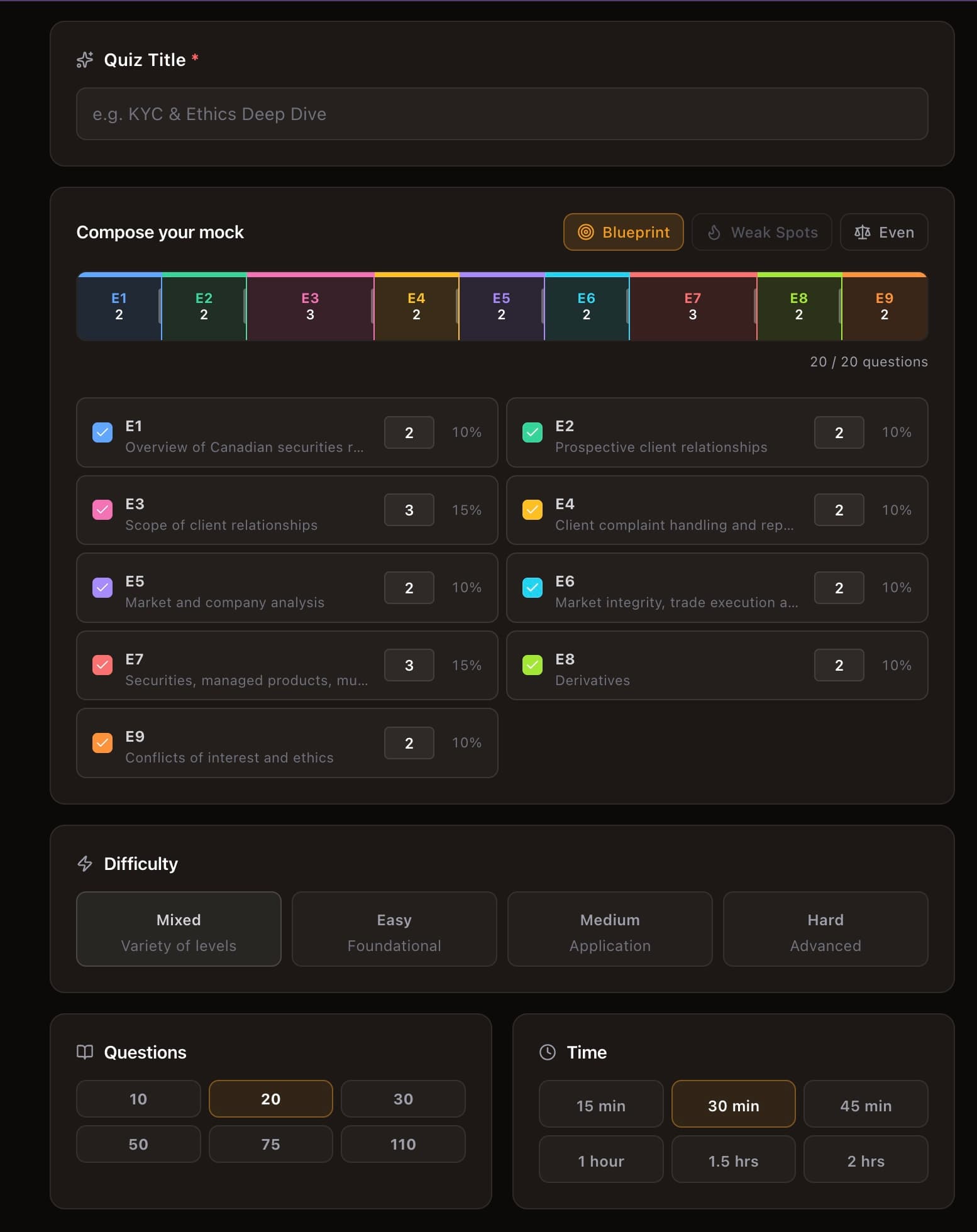
Click + Create New from the Custom Mock page to open the builder. Everything lives on a single screen — no multi-step wizard.
Name it something useful
"Custom Mock - 2026-03-16" tells you nothing in two weeks. "KYC Suitability Hard Drill" tells you exactly what it was testing and why you built it. When you're reviewing your mock history trying to decide which one to retake, the title is all you'll see at a glance.
Compose your exam — pick a strategy, then fine-tune
This is where custom mocks earn their keep. Instead of a flat checklist, you compose your exam as a distribution across the 9 CIRE elements — and you start from a strategy:
- Blueprint weights every element exactly like the real CIRE. The closest thing to true exam conditions.
- Weak Spots reads your own quiz history and automatically tilts the exam toward the elements you score lowest on. This is the scalpel — let your data decide where the questions go.
- Even splits questions equally across whatever you've included.
The colored bar is your exam: each segment is an element, and its width is how many questions it contributes. Want more of one element? Drag the divider between segments, or type an exact question count next to it in the list — the others rebalance automatically so your total never changes. Uncheck an element to drop it entirely.
Every element also shows your mastery — your accuracy from past quizzes, colored red (weak) through green (strong). That candidate scoring 80% on Regulatory Framework and 45% on Conflicts of Interest can see exactly where the red is and pour their questions there — or just hit Weak Spots and let EnCiro do it.
Set the difficulty
Easy tests recall — definitions, rule numbers, regulatory bodies. If you can't pass Easy on an element, you haven't learned the content yet. Go back to the Learning Centre.
Medium tests application — a client scenario, a compliance decision, a suitability judgment. This is where the real CIRE lives. Most of your mock time should be here.
Hard tests analysis — multi-step reasoning, edge cases, comparing two plausible options. If you can handle Hard consistently, the actual exam will feel manageable.
Mixed pulls from all three. Closest to exam conditions.
Questions and time
Question counts range from 10 (a focused drill) to 110 (near full-exam length). Time limits run from 15 minutes to 2 hours.
Every mock is timed. When the timer hits zero, your quiz auto-submits with whatever you've answered — unanswered questions score zero. This isn't optional. The CIRE doesn't pause for you, and neither does EnCiro.
Practice quizzes train you. Custom mocks test your training.
EnCiro's practice quizzes are designed to build knowledge — element by element, difficulty by difficulty, with detailed explanations that teach you why each answer is right or wrong. Custom mocks serve a different purpose. They let you combine elements, simulate real exam conditions, and stress-test your preparation against configurations that match the actual CIRE.
The real exam doesn't test one element at a time. It throws KYC questions next to derivatives questions next to ethics questions, and it expects you to context-switch without losing focus. Custom mocks are where you practise that.
Think diagnostic, not report card
Stop thinking of mock scores as pass/fail verdicts. A 45% on a targeted Hard mock of your weakest elements is more valuable than an 80% on material you've already mastered. The 45% tells you exactly what's broken. The 80% tells you what you already knew. Build mocks that expose gaps — that's where the learning happens.
Three setups that actually work
The Element Assassin
Your dashboard shows one element dragging your average down. Time for surgery.
- Strategy: Weak Spots — or keep just the weak element and drop the rest
- Questions: 20-30
- Difficulty: Mixed
- Timer: 30 minutes
After the mock, spend as much time on the results page as you spent on the quiz itself. Read every explanation — not just the ones you got wrong. If your score is below 50%, go back to the Learning Centre readings for that element first. More practice on material you don't understand just reinforces the misunderstanding.
The Full Dress Rehearsal
This is the "make it real" simulation. Do this at least three times before your actual exam.
- Strategy: Blueprint — mirrors the real exam's element weighting
- Elements: all of them
- Questions: 110
- Difficulty: Mixed
- Timer: 2 hours
Sit down. Close your other tabs. Put your phone in another room. The point isn't just to test your knowledge — it's to test your stamina, your pacing, your flagging discipline, and your ability to stay sharp on question 90 when you've been at it for ninety minutes.
Space your dress rehearsals
Don't do three full mocks in three days. Space them with focused studying in between — one per week in the final month. Each mock reveals weaknesses; the time between mocks is for fixing them.
The Speed Demon
You know the material but keep running out of time. The fix isn't more content — it's faster decisions.
- Strategy: Blueprint or Even
- Elements: all of them
- Questions: 50
- Difficulty: Medium
- Timer: 45 minutes (under a minute per question — tight)
This forces you to stop second-guessing. Read the question, eliminate two options, pick between the remaining two, move on. The discomfort of a tight timer is the point — it trains the snap-judgment muscle that the real exam demands.
Your saved mocks
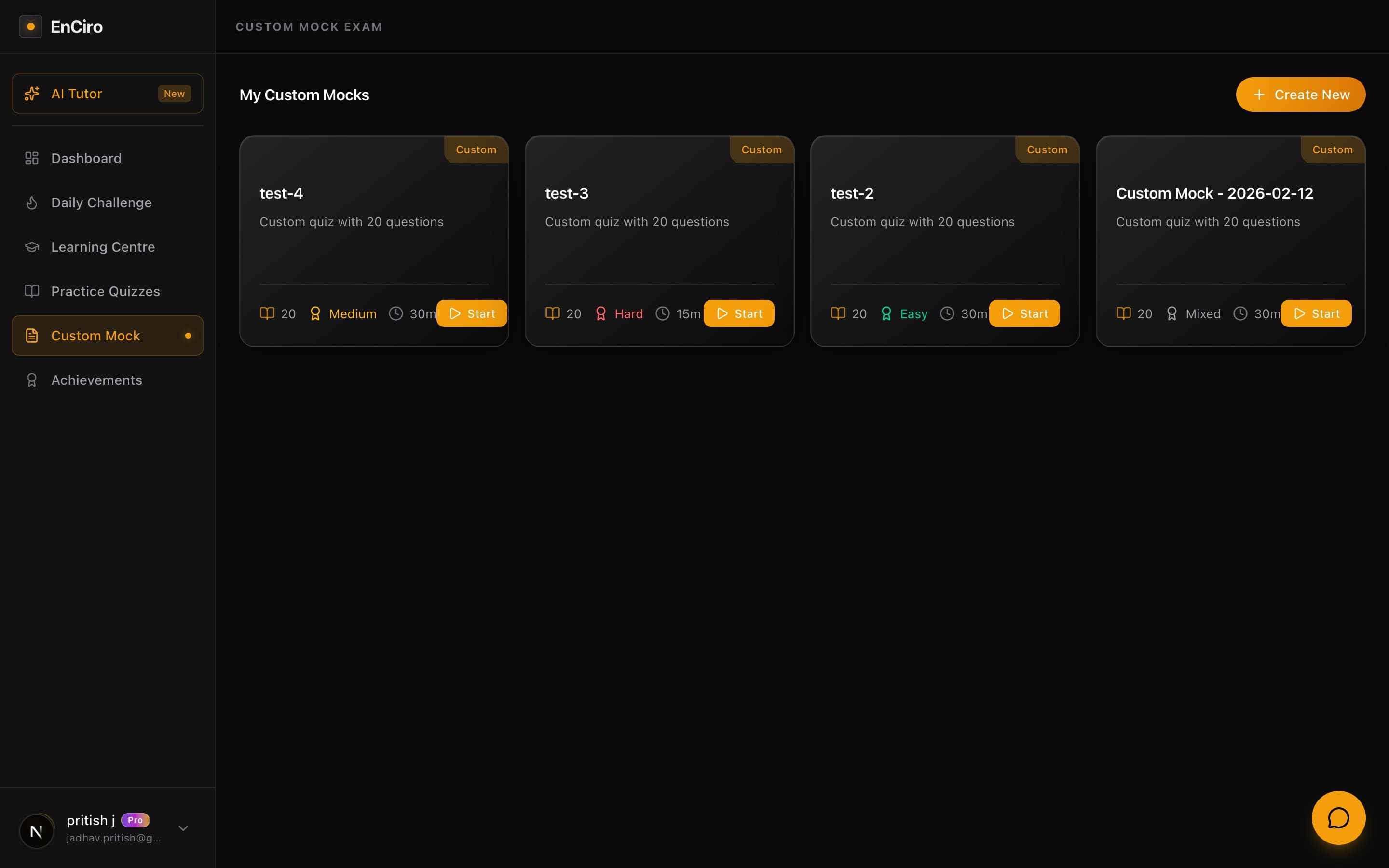
Every mock you create lives on the Custom Mock page as a card. Each one shows the setup — difficulty, question count, time limit — and you can retake any of them.
Retaking a mock you struggled with two weeks ago, after targeted studying, is one of the most effective things you can do. The score comparison tells you exactly how much you've improved — and whether the gaps you identified are actually closing.
Every attempt feeds your analytics
Mock scores feed into your dashboard analytics alongside regular quiz scores. Score trends, element breakdowns, difficulty performance — the more data you generate, the more precisely your analytics can pinpoint where to focus next.